Global is the centralised file unit that contains all of our work product. As the team is built with strong sense of collaboration, having a commonly-understood and agreed folder naming structure will create ease for the team to locate files that they need.
In general, as a branding agency our projects/clients are in one of the two types:
- Client that needed us to create their brand from zero (e.g. Beast of the East, etc.)
- Client that comes with existing brand identity (e.g. ALDI, Volvo, etc.)
1. Zero-up Branding Project
In this type of the project, there are 6 main sub-folders, as shown in the picture below.
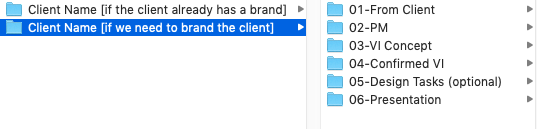
01-From Client:
This contains all the information that literally sent from the client, briefing, pictures, notes, documents, flowers and chocolates.
02-PM
This folder is for all the PM-related files, e.g. timeline, email correspondent.
Remember: please do not put quotation into this folder, because finance and design should not mix. There is a dedicated Business Doc folder [you know where it is] which contains all the financially-related document.
03-VI Concept:
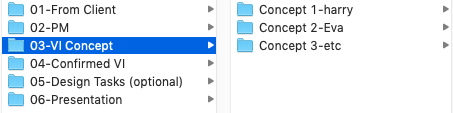
This contains the files from the “quick-and-dirty” iteration process. Usually we plan multiple designers doing the same thing in this process, therefore it is logical to organise the sub-folder base on the name of the designers, e.g. Concept X – Designers’ Name [see picture below]
04-Confirmed VI
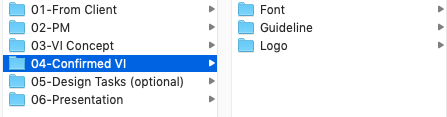
This folder is the summery / final product of previous process. Once the “design iteration” process end, this folder collects all the confirmed work product, e.g. final logo, final font, final guideline[see picture below].
05-Design Tasks(Optional)
This folder is for the subsequent design tasks that follows immediately the confirmation of the VI identity, for example, brochure, leaflet, rollup etc. Obviously this depends the client and their needs, therefore this folder is optional.
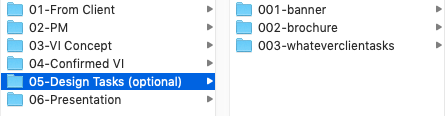
Note: for detailed best practise within the design task folder, please scroll down.
05-Presentation
This folder is for all the presentation / deck that we have prepared for the client.
2. Client with existing branding
Compared to the first type of project, the main differences are there won’t be the need for VI concept and confirmed VI folders, instead those assets will be provided by the client from the start up [see picture below].
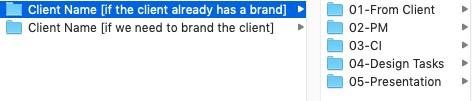
01-From Client:
This folder stays the same, it should contain all the information that literally sent from the client, briefing, pictures, notes, documents, and so on.
02-PM
This folder is for all the PM-related files, e.g. timeline, email correspondent.
Remember: please do not put quotation into this folder, because finance and design should not mix.
03-CI
Unlike the previous project type, we usually receive the CI assets from the client before we start any work, e.g. Volvo, Aldi, Maui Jim. This folder would be the place to store the logo, font, colours, guideline, etc from the client.
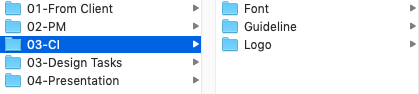
04-Design Tasks
Similarly the design tasks we execute under this client will be saved here

Please note, under each task, we also have a specific arrangement for the files within. Take the 001-banner for example, the sub-folder would contain briefing document (from client) about this specific task. _archive folder for the obsolete version and Current Design that always only contains the current version.
-
- _archive
- This folder should contain all the history version of the tasks, up to 5 rounds of the history is recommended.
- Briefing
- Current Design:
- This should contain the design preview of this task in its current version/revision. Due to the nature of client preview, this folder can also be shared with the client at once.
- _archive


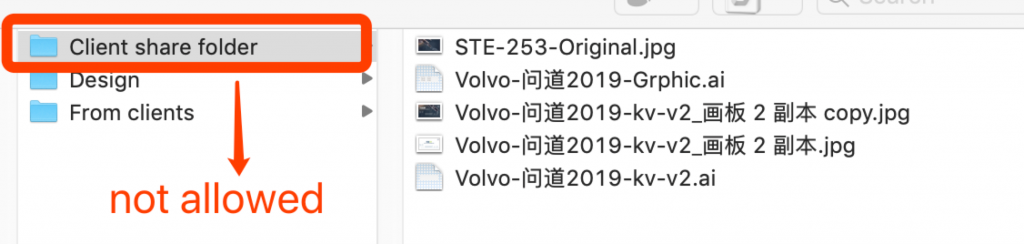
Please note: This replaces the “Client share folder” which currently practised by the PM team. [See picture below]
05-Presentation
This folder is for all the presentation / deck that we have prepared for the client.