CORE PRINCIPLE:
Every Expense must be recorded in WorkEtc.
Every transaction must be recorded in WorkEtc on the day it is cashed out.
Expenses are recorded based on the supplier’s invoice*. For transaction without invoice, refer to FAQ below.
As soon as we receive the supplier invoice, the expense needs to be recorded, EVEN IF the payment is to be made at a later date.
The payment is a transaction to record when we cash out the money. Follow this link to learn how to record transactions.
* Particular cases are treated in the FAQ below.
PROCESS RULES:
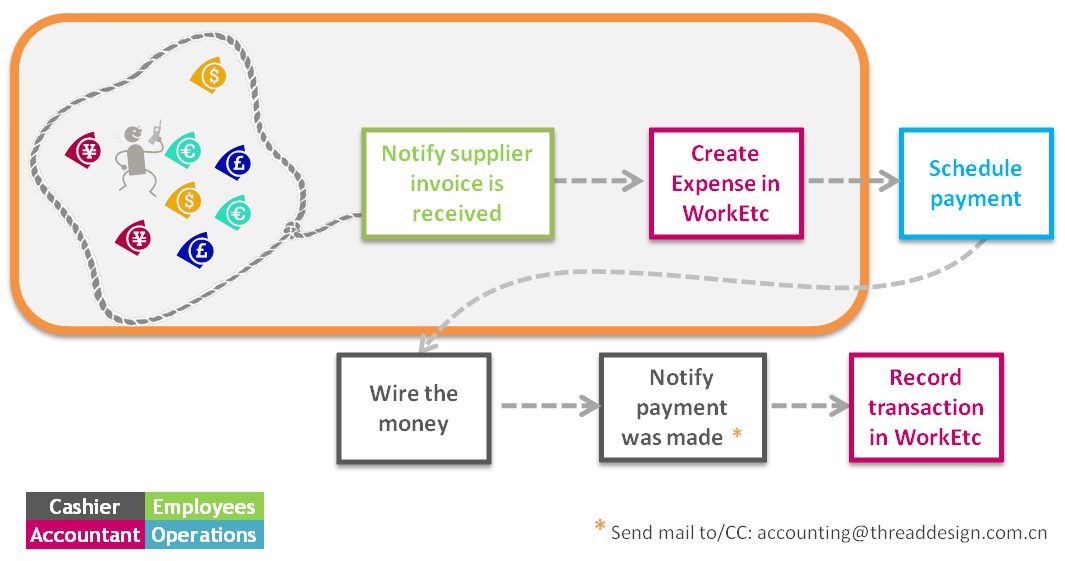
1/ Whoever receives a supplier invoice sends it immediately to accounting@threaddesign.com.cn (on the day received)
Very easy notification:
Each time you are about to make an expense, pls send an email to accounting@threaddesign.com.cn
Please give those details:
– Supplier name
– Expense name
– Expense total
– Payment due date
– Related project if any
– Scan of supplier Fapiao or date. All expenses should have a fapiao to give to Grace.
All expenses >1000 RMB need to be approved before being validated with suppliers (= get a reply to your email).
Any update to a validated expense to be notified the same way as described above.
2/ Accountant records expense in WorkEtc within 1 working day (+ add invoice due date!)
3/ On due date, Operations asks our Cashier to transfer money
4/ When authorized, Cashier proceeds to transfer
5/ Accountant records transaction in WorkEtc immediately after paid
Checks:
– QA recording = Justine
– At any time balance bank account and WorkEtc bank balance must match!
– Any new cost > 1000 RMB must be approved and notified to Justine as soon as likely
HOW TO RECORD?
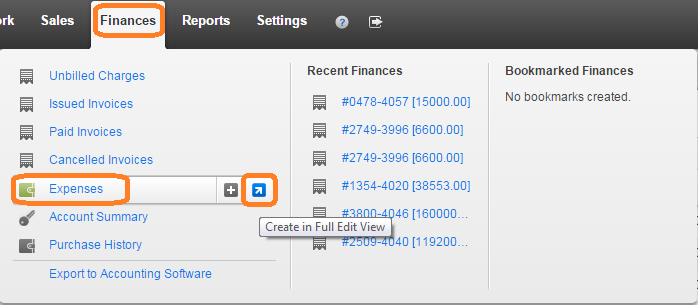
- Tab Finance >> Expenses >> Create in full edit view
- Fill in the details in panel 1:
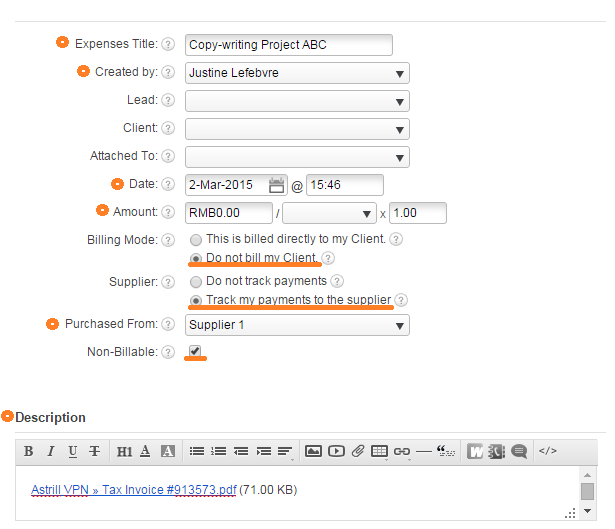
– Expense title = the name of the expense (for example: “salaries January”, “production cups for project XXX”, “coffee beans”)
– Created by = check this is your Worketc user
– Date = date on the invoice (issue date)
– Amount = expense total in RMB (for foreign currencies details, see FAQ below)
– Billing mode = tick “Do not bill my clients”
– Supplier = tick “Track my payments to the supplier”
– Purchased from = enter supplier name. ! Always check in the drop-down menu if the supplier what entered previously.
– Non-Billable = tick option
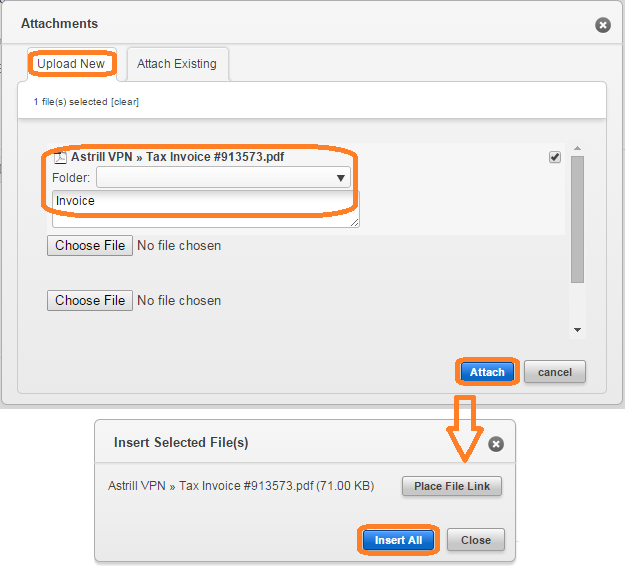
– In “description” field, attach the invoice for this expense:
- Fill in the details in panel 2:
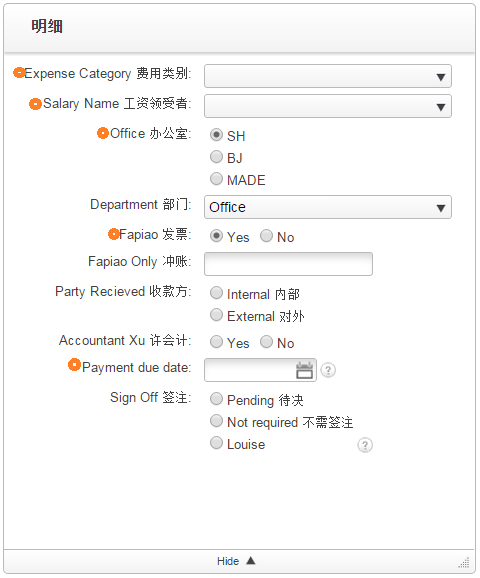
– Expense category = see details below
– Salary name = S1 for Chinese staff / S2 for foreign staff / S3 for founders
– Office = tick Shanghai
– Fapiao = tick if fapiao received
– Payment due date = ! very important, fill in as stated on the invoice of check with the expense recipient the supplier payment terms
– Other fields: no need to fill in
TYPES OF EXPENSES
- Office & general expenses 其他办公及综合费用 = office supplies, drinking water, coffee, printer/computer suppliers, water, gaz, electricity costs and all costs related to building maintenance, bank management fees, …
- Cost of goods sold 主营业务成本 = production costs, expenses made directly for a particular project (for example: stock images, 1 time use plugins, …) (! fill in “attached to”)
- Salary 工资 = Chinese staff, Foreign staff, Directors compensations (rent but no refunds of expenses!).
! no freelancers
- Directors Personal 董事私人= avoid using!
- Other salary related 其他工资相关的费用 = HR services costs, the individual income tax
- Rental 房租 = Office rent
- Other occupancy costs 其他居住费用 = Foreigners residence permit
- Client service costs 客户服务及维护 = costs which enter indirectly in services provided to clients (server, asana, worketc, harverst, astrill, plugins, …)
- Travel & ent 出差及招待费用 = travelling expenses, team buildings, companies events
- New biz & promotion 新业务推介费用 = expenses generated while doing business development
- Telecom / Internet 通讯 / 网络 = internet and phone costs for the office + Kuaidi?
- Net interest expense / (income) 春利息费用 / (收入) = not in use
- Other expense / (income) 主营业务外的费用/ (收入) = not in use
- Bonus 奖金
- Legal 审计法务费
- Corporate tax 企业所得税 = amount deducted from bank account by the government + VAT/fapiao/income tax
RENT
– No5: record one month rent on the last day of each month
SALARIES AND REMUNERATIONS
The following salaries and remunerations belong to “Salary 工资” category
– Chinese Staff (S1): record the expense on the last day of the month people work. Wire the money on the 5th of next month.
– Foreign Staff (S2): record the expense on the last day of the month people work. Wire the money on the 15th of next month.
– Directors (S3): record the expense on the last day of the month people work. Wire the money on the 15th of next month.
! Freelancers and other self employed staffs DO NOT belong to “Salary 工资” category.
The Ayi, the Computer guy, and other people supporting the office belong to “Office & general expenses 其他办公及综合费用”
Copywriters, freelance designers, freelance developers, Social Network specialists etc. belong to “Cost of goods sold 主营业务成本” (if the whole invoice belongs to one particular project) or “Client service costs 客户服务及维护” (if attached to multiple projects).
FAQ
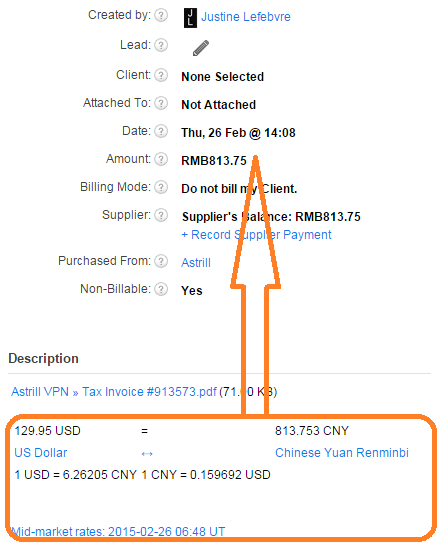
- What if the invoice is in another currency?
Use http://www.xe.com/currencyconverter/ to convert the amount from the foreign currency to RMB.
Copy and past the result in description of the expense, and the total in RMB as total amount.
- What if the supplier doesn’t provide an invoice?
Record an expense with as many details as you can, and leave a note about in description about when the fapiao should come in.