Our cloud storage system is on Jianguoyun.
Please contact management for a personalised login.
.
Our cloud storage system is linked with our Global Drive.
Files are uploaded/downloaded to/from the cloud automatically every 30mins, vice versa.
Therefore, the filing system on the cloud is identical to Global.
.
To Share file with client
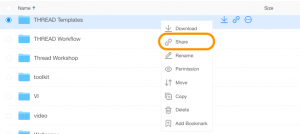
Right click on the file that you’d like to share, then select “Share”.
A window with a link will pop-up.
!!!BUT THIS LINK IS NOT READY YET!!!
Why? Because right now the link could only be accessed by Jianguoyun member. And we don’t want that.
How to fix it?
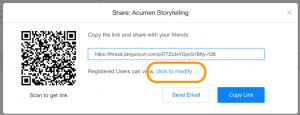
Select “click to modify”, then it would change to another window.
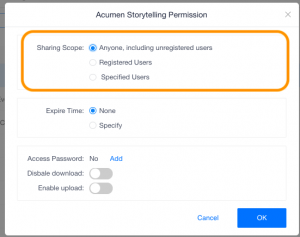
In “Sharing Scope”, select “Anyone, including unregistered users”
*Please note, for every file we share with the client, we MUST encrypt it with a password.
To do that, in the same tab, in “Access Password”, click “Add”
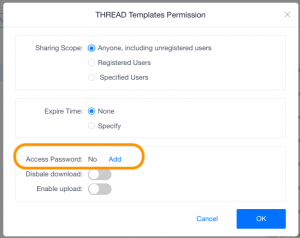
A password would be generated automatically.
Then press “OK”
Now the link is ready to be shared with the client :)
.
Good work!