THIS PART WILL COVER:
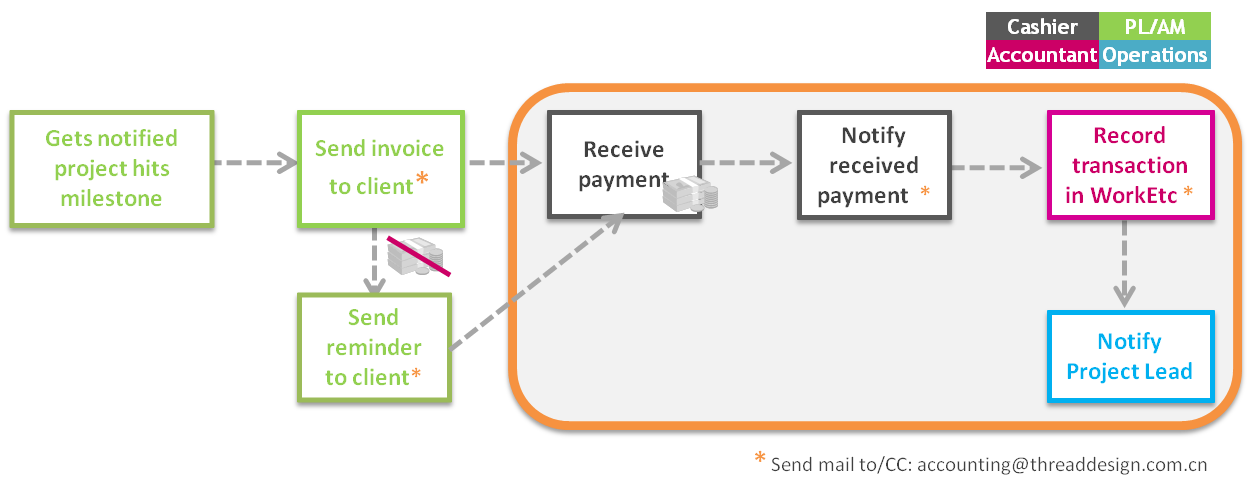
Before you are able to record a payment from a CLIENT to THREAD bank account, there must be an invoice opened for this client (read all about it here).
WHO RECORDS PAYMENTS?
The accountant
WHEN TO RECORD PAYMENTS?
After our cashier sends an email (to: accounting@threaddesign.com.cn) to notify the money has arrived.
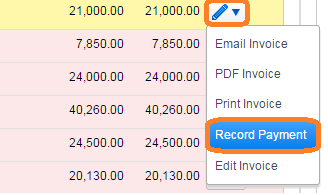
In WorkEtc, go to Finance >> Issued Invoices. Find the relevant invoice in the list and click the button “record payment”.
Fill in the payment information:
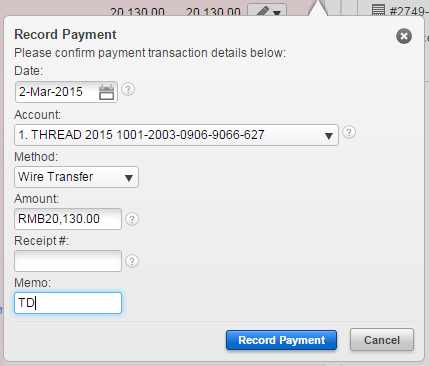
– Date = the date of transfer to our bank account (as it shows on bank record)
– Account = the account the money comes in
– Method = always “Wire Transfer” except for Petty Cash cases
– Amount = MUST be same as the invoice
– Memo = write your initials (accountant: LFS)
AFTER THE PAYMENT IS RECORDED, send an email to accounting@threaddesign.com.cn with the following information:
“Recorded, Invoice number XXX, Invoice WorkEtc link”