IN THIS PART WE WILL COVER:
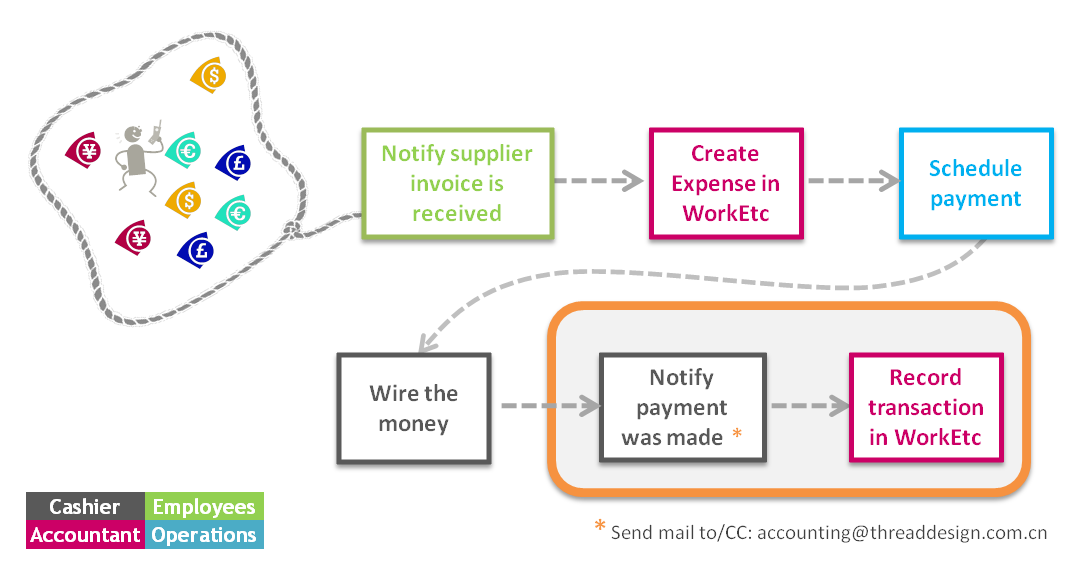
Every transaction must be recorded in WorkEtc on the day it is cashed out.
Before you are able to record a payment from THREAD banks account to a supplier, you must open an expense for this invoice (read all about it here).
In WorkEtc, go to Finance >> Expenses. Find your expense in the list and click the button “record payment”.
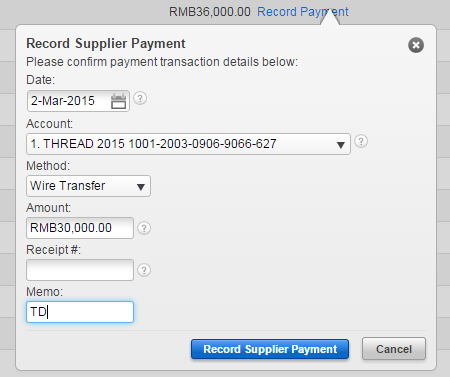
– Date = the date of transfer from the bank account (as it shows on bank record)
– Account = the account the money comes from
– Method = always “Wire Transfer” except for Petty Cash cases
– Amount = MUST be same as the invoice and expense
– Memo = write your initials (accountant: LFS)