THIS PART WILL COVER:
.
.
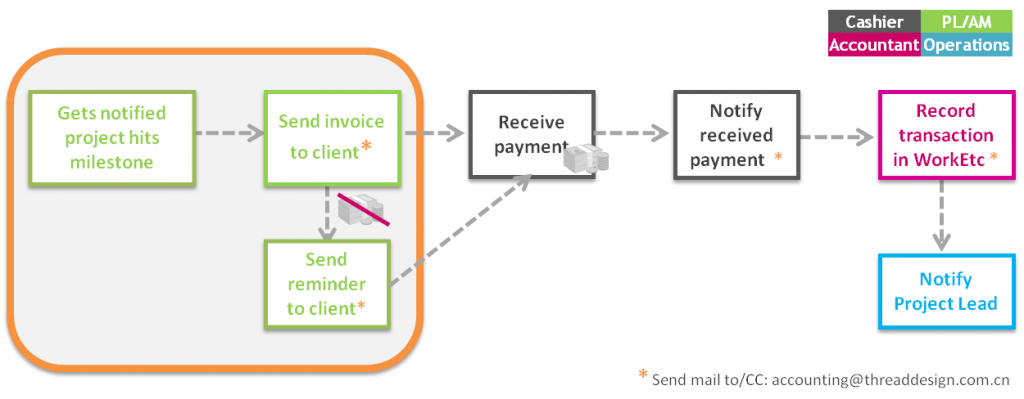
WHO INVOICES CLIENTS?
Account manager after requested from Project Leads or by Projects Leads directly.
.
HOW TO INVOICE CLIENTS?
In WorkEtc, got to Finances >> Unbilled Charges
Find your project in the list, and expand the drop-downs until you find the billing milestone then select the whole hierarchy and click “invoice”.

You can use the button “preview in new window” for final check before you send the invoice.
.
Check the details of the invoice:
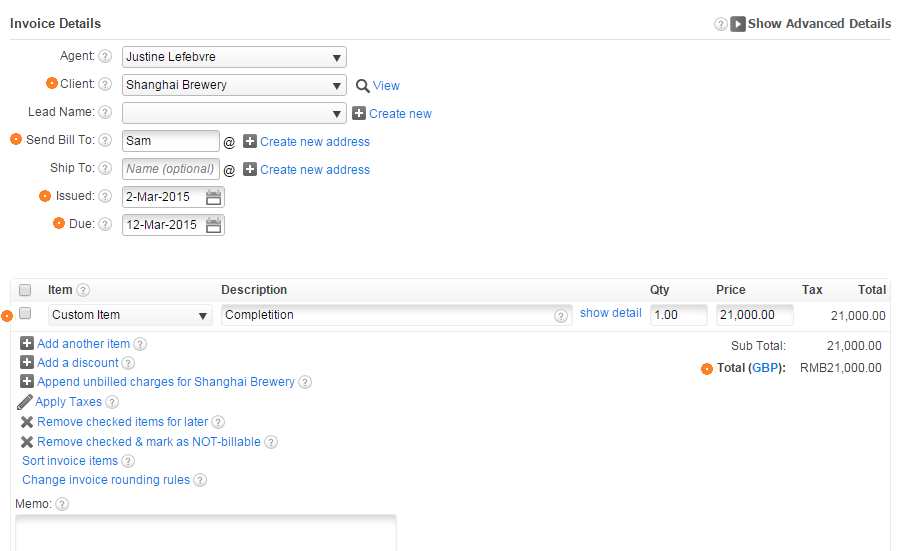
You can also use the button “preview in new window” for final check before you press “save”.
– Client
– Send bill to: check this is the right contact at the Client’s company
– Issued date
– Due: It should always be 10 days after issued date, unless you are pre-invoicing.
– Total amount and description of the milestone
– Invoice type: by default, invoices are in RMB to be paid on ICBC account in China (bank account details will show on the invoice).
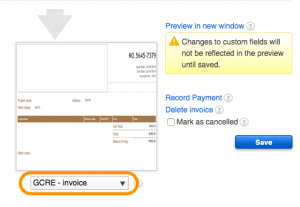
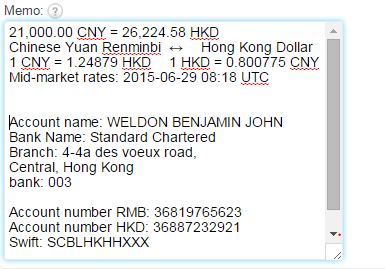
If the contract agrees the client pays in Hong Kong, change the type to “Invoice – HK” and convert the invoice total from RMB to HKD on XE.com. Use the rate of the day of the invoice and copy past the result in the “Other Notes” section of the invoice. DO NOT update the invoice total directly.
.
!! FOREIGN CURRENCY PAYMENT !!
If a client is paying from outside China then please transfer into China as RMB only.
Client pays all fees.
If paying into our UK or HK account please use the daily exchange rate on http://www.xe.com/ and remind your client to accept the bank charges and handling fees to avoid transfer complications (all bank charges are on client’s side).
Please add this as a note when sending out UK/HK invoices.
If there is a discrepancy in the amount transferred due to fees then the outstanding balance will be added to the final payment.
.
WHAT IF MY BILLING MILESTONE IS NOT IN THE UNBILLED LIST?
In WorkEtc, go to Work >> Projects.
Find your project in the project list and open it.
At the top right of the screen, click “Manage Project” >> “Open in full edit view”.
Scroll down to “billing” and update the “billing date” of the milestone you need to invoice.
Click “save” down the page.
Then go back to the unbilled list and follow procedure from the top of this page.
.
HOW TO SEND THE INVOICE?
At this stage, you have created your invoice and recorded it in our accounting system, but the client won’t receive the invoice until you send it.
=> after you press “save” on the invoice, Click “email invoice” at the top left of the window.
Check the client email address and always CC finance@threaddesign.com.cn with every invoice you send.
.
HOW TO PROVIDE CHINESE FAPIAO IF THE CLIENT REQUESTS IT, ADDITIONALLY TO THE WORKETC INVOICE?
If your client request a fapiao, send an email to sqin@azuregroup.com.cn to request it.
In your email, always mention:
- Attach the invoice with the total that should be on the fapiao
- Fill in “GCRE Thread Fapiao Application Form” – location: Global – Business Docs ( ! Confirm the company name with the client first ! Fapiao name might differ from client name)
- Attach above form to your email.
- State the delivery address of the fapiao: to client office directly/come to our office first
- Cc in Justine and Monica
- Don’t forget to thank our accountant for her/his help :)
.
Notes:
– Handle fapiaos with care: it’s really complicated to update, cancel, reissue a fapiao!
– VAT fapiao are not available unless for bigger projects. If your client requests a VAT fapiao, you must check with acccounting@threaddesign.com.cn first, then follow the procedure they send you.
.
NEXT STEP: HOW TO RECORD CLIENTS PAYMENTS